

Robotic vacuum cleaners were created so that you would never have to vacuum by hand again. They are quite autonomous on their own, but... It turns out they still require too much human attention. But the Samsung Jet Bot Ai+ tries to change this and free the user as much as possible, providing him only reports on the work done.

Samsung Jet Bot Ai+
Table of contents
Appearance
Functions
Cleaning process
Competitors
iRobot Roomba S9+
Roborock S6 MaxV
Total
Appearance
Samsung Jet Bot Ai+ looks... futuristic (and a bit like a tank), but what is surprising - with its considerable size, including the base, it fits quite organically into the interior.
Such a huge base here, by the way, for a reason. After cleaning, the Jet Bot Ai+ pumps all the collected dust into the base, and then you take the bag out of it. The bag solution may seem outdated, but in fact, it's all about not blowing dust where it's already clean.
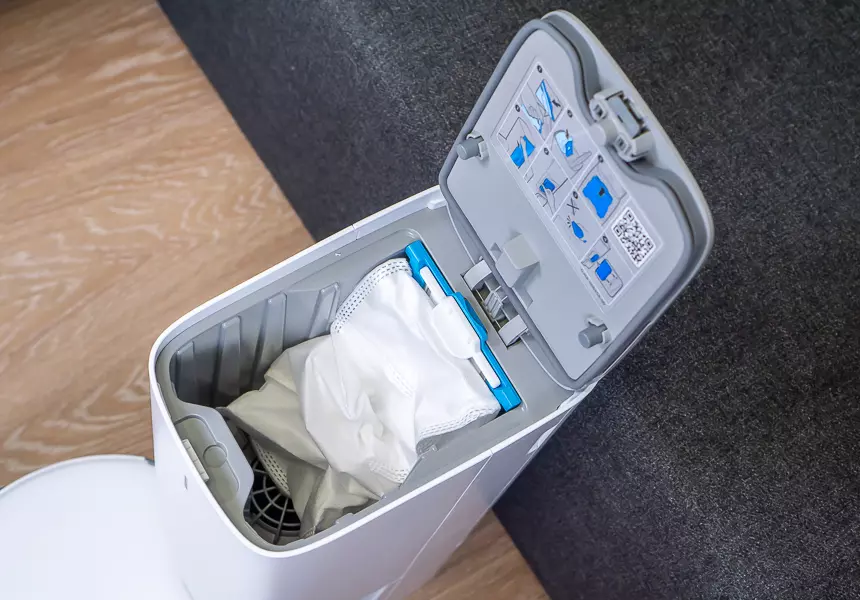
That is, as it happens with conventional robots: after it has returned to the base, you take out the dust canister (which, depending on the design, can also get dirty on the outside), and throw the dust into a trash can or bag. It's almost impossible not to "splash" a little dust around while pulling the dust canister out. With the Jet Bot Ai+, which is in the base and additionally closed with a latch, this scenario is least likely. An additional advantage is that you don't have to bend over the robot to the floor level.
On the base itself there is a button, which loosens the mount and the cover is lifted by a spring. Under it is a white dust bag, which can be pulled out by the plastic bar. As soon as you pull up the bar, the dust canister inlet is blocked.
In the package with the robot the manufacturer put one additional bag-dust collector, as well as a replacement filter. The manufacturer himself claims that you will have to clean the dust bag in the base not more often than once every 1 to 3 months.
On the body of the robot there are touch buttons "home" and "pause". It is a pity that there is no "local cleaning" like Roborock, so you don't have to reach for your smartphone in this situation as well.
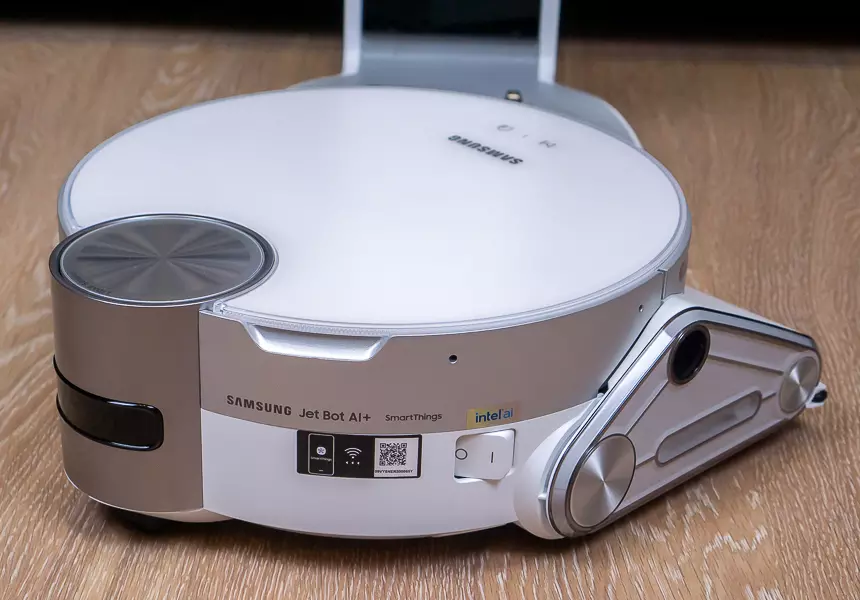
Underneath you can see quite impressive wheels, thanks to which the robot can drive on the carpets (alas, I have no data on the maximum height of the carpets).
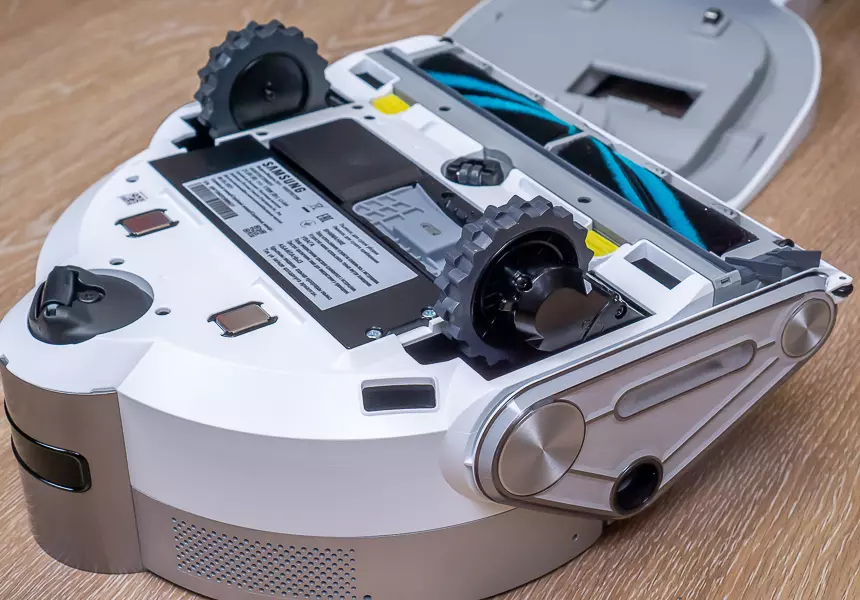
There is also a turbo brush for better cleaning. In general, almost all expensive robotic vacuum cleaners are equipped with a turbo brush, but cheap ones, as a rule, are supplied without it. Here, however, the brush is not usual, with a bunch of grouped fluff, and soft, and even with silver threads. It is gentle to hard surfaces, but most importantly, due to the antistatic effect, hair does not stick to it (instead, it is pulled inside the vacuum cleaner, as it should be).
The main feature of the Jet Bot Ai+ is the LiDAR sensor, which is located in a cylindrical "tower" that rises slightly when turned on. Also on the body there is the most common camera for shooting video. This is also a very interesting feature, I will consider it in more detail below.
Functions
Aside from the actual cleaning itself which I will describe in details below, the robot can also... watch over your house! Okay, here we should tell you everything in order. To control the robot you need to install the Smart Things app on your smartphone (Android or iPhone). There you add the vacuum cleaner, connect it to your home Wi-Fi, and then you can control it from anywhere in the world where there is access to the Internet.
There is no separate remote control for the robot, but it is not needed here (just like the virtual walls). In many ways, the principle of operation is similar to the Roborock models. The robot can build a map of your apartment, divide it into rooms, and determine where everything is/stays. For example, I have a TV on a 50 cm high bedside table and the robot understands that it is a bedside table with a TV. It also knows how not to fall off high surfaces.
In general, thanks to a set of sensors, which includes a real camera (like Roborock S6 MaxV) and even the LiDAR sensor, the robot is able to build a map of the room simply by spinning in one place, and identifies objects with a size of only a centimeter. The LiDAR sensor is needed to determine the distance to walls and other objects.
All information from the camera is "viewed" by Intel's built-in artificial intelligence. The robot recognizes individual objects, and this is necessary so that it does not drag the same socks thrown on the floor, but neatly bypasses them. However, with small objects like pencils or drinking tubes (don't laugh, I tell it like it was), mishaps can happen. So before I turned in this article, I was digging a pencil and a straw out from under the robot.
The map is built the first time you clean (you can reset and rebuild it later). After the map is built, you can already start cleaning a specific room or select zones (one or more). In addition, it is possible to mark some zones as forbidden for a robot to pass through.
The main actions of Jet Bot Ai+ are commented by voice, but you can also turn it off - for example, choose simple beeps instead or turn off the sound altogether. However, voice notifications, especially if you are not yet used to the robot's behavior, do sometimes help you understand what the robot is doing and why.
So there you go. As I said, among the sensors of the Jet Bot Ai+ there is a real camera, which can transmit a picture to your smartphone in real time. Moreover, if you are afraid that the image of your apartment will be intercepted by someone over unprotected Wi-Fi, you can turn on video encryption.
So, even when you're away from home, you can watch what's going on there, including manually controlling the robot like a drone. But that's not all!
The Jet Bot Ai+ has an "observation mode" in which it moves out to a point (or area) designated for observation, and monitors the surrounding area, tracking motion. If a moving object is detected, the robot will turn so that this object is visible in the camera.
But most importantly! When the robot detects movement, it records a 10-second video and sends it to you! These videos are stored in the Samsung Smart Things cloud service and can be viewed and saved to your smartphone.
You can set a schedule for patrolling - for example, when you go to work or when you come back. Here, however, there is one disadvantage - the robot does not patrol all the time, but at intervals of once an hour. The patrol duration is about 10-15 minutes, after which it returns to the base to recharge. And although the camera is on the back side of the base, even during the charging process, movement in the camera lens is no longer tracked. And that's a shame.
In addition, I would like to point out that the video notifications are very unintuitive. I quickly figured out how to turn on the surveillance itself and create a schedule, but at first I was frustrated that no notifications came to me, even though the robot was obviously monitoring the movement. When I started viewing the camera image, a message popped up calling me to download SmartThings Video on the home screen, but which home screen it was, I couldn't figure out for a long time.
So. On the main screen of the SmartThings app, you need to go to the "Life" tab, and there click on the SmartThings Video widget. In the menu that opens, you can link Jet Bot Ai+ to SmartThings Video, and then you will start receiving notifications and recording videos. In general, the Russification of the application is far from perfect.
The cleaning process
Samsung Jet Bot Ai+ has one colossal advantage over 99% of the robot vacuum cleaners on the market - its shape. Honestly, I do not know why manufacturers of such devices rarely resort to this simple trick, but it is quite obvious: thanks to just one straight edge the robot can go into any corner of the room (of course, if you do not have sharp corners, that is, less than 90 degrees). And although the suction brush is not located on the edge, because of the high suction power this is not a problem - the body of the robot "covers" the floor and a significant negative air pressure is created under the whole front part of the body.
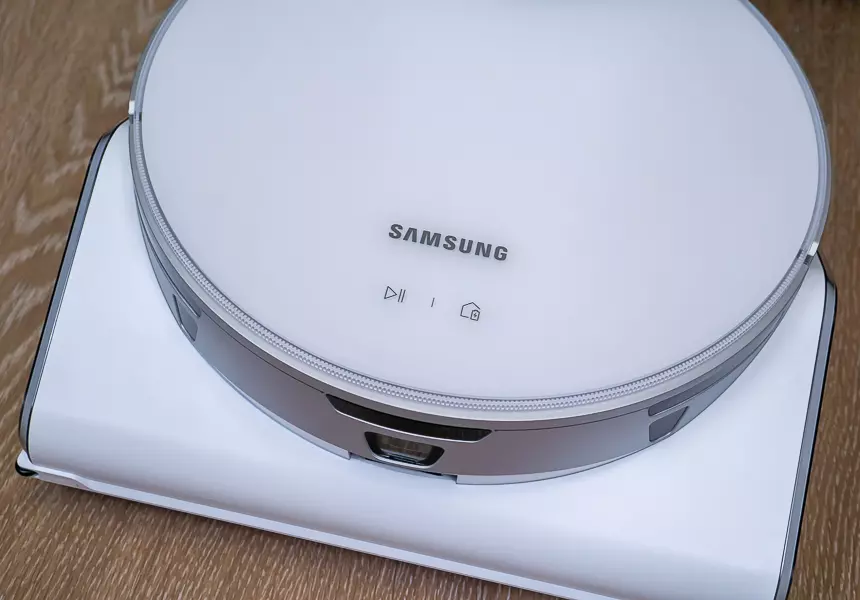
By the way, about the suction power. The manufacturer provides only data in watts, which does not really say anything. It is a good idea to specify the pressure (vacuum), because depending on the shape of the vacuum cleaner, and the size of the inlet, and the presence of additional accessories (different brushes, for example) at the same power the real suction power can be very different. And I have no complaints about the quality of the Jet Bot Ai+ suction.
The robot itself cleans very thoroughly in automatic mode. First it zigzags around the room (sometimes several times), and then it goes separately along the walls and other obstacles (also several times). I would even say that the Jet Bot AI+ is extremely fanatical about cleaning. If some obstacles interfered with the robot, it will definitely tell you about it in the cleaning report, and will offer to repeat the cleaning exactly in these places (you can do it with just one button).
The robot goes around all obstacles in a circle, or on the nearest possible trajectory, so as not to damage anything. Although, if the nightstand is standing on small legs or wheels, the robot may bump into it, but not too much. Apparently, the robot does not "see" some very delicate objects like tripod legs, but there are standard collision sensors here too - in the end, during all the time I tested none of the tripods were damaged, nothing fell anywhere, was not scratched, etc.
By default, the suction power is set automatically (smart mode). The robot itself determines how dirty the floor is, and what kind of floor it is - on carpets the power increases. And yes, the robot goes on carpets without any problems, but I don't have very high carpets at home, a couple of centimeters at most.
The entire cleaning process can be observed in real time in the app - where the robot is, what path it has already taken.
When the robot finishes cleaning, it returns to the base and "unloads" all the dust there. On the one hand, this is one of the main advantages of this model, but on the other hand, this process is quite noisy. This is made, again, in order not to blow dust all over the room. So, and during the cleaning itself Jet Bot Ai+ can not be called quiet (74 dBA), but during the pumping of dust from the robot to the base it makes noise like a normal home vacuum cleaner at very high power.
Among other things, this is why you can set exactly when the robot will dump the dust - immediately after cleaning, or when its own container is full. So you don't have to worry about it too much. You can also specify whether the robot will clean until the battery runs out (up to 90 minutes) or the bin is full, or whether it will go back to base as soon as it thinks the job is done.
At the end of cleaning, the app displays a report - how much time was spent, how much surface area is covered, the path of cleaning and all the obstacles are drawn.
You can also, of course, set a schedule for both cleaning and monitoring, all of which are available in the Smart Things app.
Once again, there are no complaints about the quality of dry cleaning. However, here, as well as the nearest competitor, iRobot Roomba S9+, there is no wet cleaning. Most likely, this is due to the mechanism of arrival at the base, although, for example, Roborosk S7 is able to raise the brush for wet cleaning, but the base he still does not. 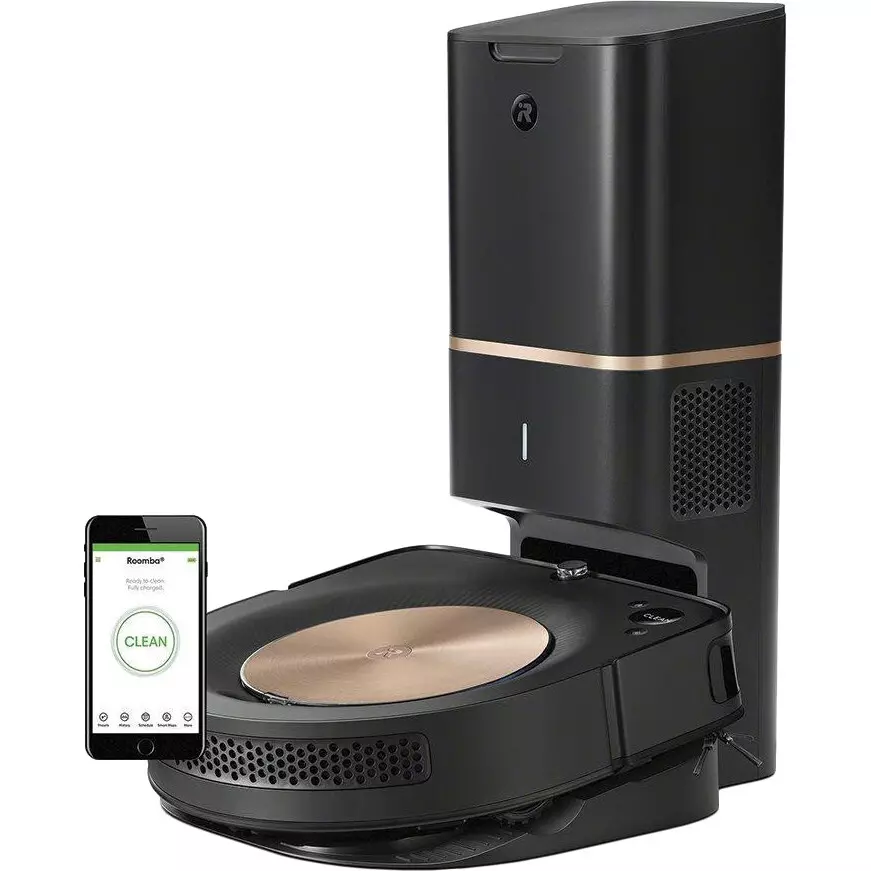
When I saw the price of the Samsung Jet Bot Ai+, I thought it was kind of expensive. But the iRobot Roomba S9+ costs even more - 117 thousand rubles against 90 thousand for Samsung. Of course, iRobot has other models that are cheaper, but without the straight edge. Although, the iRobot has a strange "zoo" of models with prices from 50 to 117 thousand with hidden differences that have to be found in a pile of text on the official website. And at the same time they have an army of weird bots or sectarians in the comments on Yandex.Market who write "so go to the service center! YOU OBVIOUSLY HAVE A DEFECT, AND I HAVE THIS MODEL FOR 10 YEARS AND WORKS LIKE THE FIRST DAY! As if without the advice of sectarians ordinary people would not have guessed to contact the service. That doesn't stop you from leaving a review on the case, right?
In any case, iRobot is not that smart, it has no camera, no LiDAR sensor, and judging by the reviews, there are a lot of defects - a lot of people complain about the same error, which makes the robot refuse to clean. The Samsung Jet Bot Ai+, of course, is a new model, and it is not clear how it will be with the percentage of defects, but there are definitely more "smart" functions.
Roborock S6 MaxV
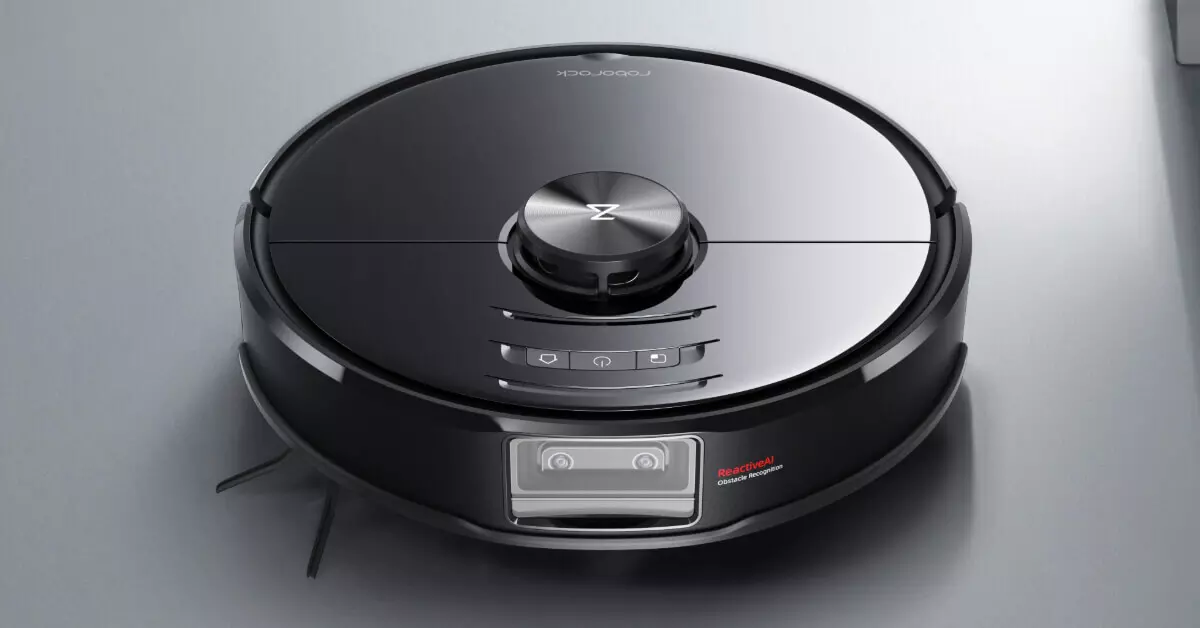
Of course, this model Roborock - not a direct competitor to the Samsung Jet Bot Ai + because it has no base with its own dust collector (as well as a straight edge), but the quality of recognition of objects scattered on the floor is S6 MaxV no worse, and the map of the room it builds excellent, and also literally from the spot (including thanks to the dual camera and the sensor LiDAR). Plus, it has wet cleaning - and all for less than 50 thousand rubles. But, of course, it does not give such convenience as the Jet Bot Ai+ - you have to bend over for the vacuum cleaner every time, and then still make you vacuum in the place where it happened, because I have never managed not to spill a little dust when cleaning the vacuum cleaner.
Total
At first I wanted to write that Samsung Jet Bot Ai+ is an excellent and convenient robot-vacuum cleaner which has only two disadvantages: the price (90 thousand rubles) and the lack of wet cleaning, but after looking at the price tag iRobot Roomba S9+ decided to remove the first and leave only the second (and noise). However, I do not know any robot vacuum cleaner with the simultaneous presence of the base vacuum cleaner and wet cleaning, but this is either the lack of my knowledge or not a consumer problem.
Of course, wet cleaning in robotic vacuum cleaners is often one name, in fact, they just drag a wet rag behind them, but, for example, Roborock S7 is seriously advanced in this regard, and is even able to scrub something.
Nevertheless, if you value your comfort and think that if you call yourself a robot, let it do everything by itself, then you will like Samsung Jet Bot Ai+. Isn't it convenient to take out a dust bag once a quarter? Of course, sometimes the robot will still have to be cleaned, including its own dust bag, but it will be rare and when you want, not when the robot needs it. So, the dust canisters of robot vacuum cleaners are small, and can fill up pretty quickly - even in a couple of days, or even in one cleaning (especially if you have a shedding pet at home). And with a full vacuum cleaner, no robot will want to keep working. That's why the self-cleaning Jet Bot Ai+ isn't just "show-offs.
Well, the function of home monitoring can be even more useful than the main function of the vacuum cleaner - cleaning. Some people, by the way, buy separate expensive accessories for this purpose.

You must be logged in to post a comment.